ISO 9001, ISO 14001, ISO 45001, and IECQ QC080000
 Manufacturing Since 2014
 FREE samples provided to ensure product satisfaction
 Rapid Turnaround: Mass Production Complete in 15 - 20 Days

A magnetic charging cable works by snapping two things together with a magnet. A small set of contacts underneath does the actual electrical work. What those contacts are made of shapes almost everything about how the cable performs.
Pogo pin magnetic connectors, USB-C, and Apple’s MagSafe all solve that contact problem differently. Picking the right one comes down to understanding what’s happening underneath the magnet. That’s true whether you’re buying a cable for your desk or specifying a connector for a product you’re building. This piece walks through how each technology works, what it does well, and where it falls short.
How do Magnetic Charging Cables Work?
A magnetic charging cable is really two systems working together. The first is alignment. A ring or a pair of magnets pulls the cable into place. You don’t have to look at the port or line anything up by hand. The second system is the connection itself, where cables start to differ.
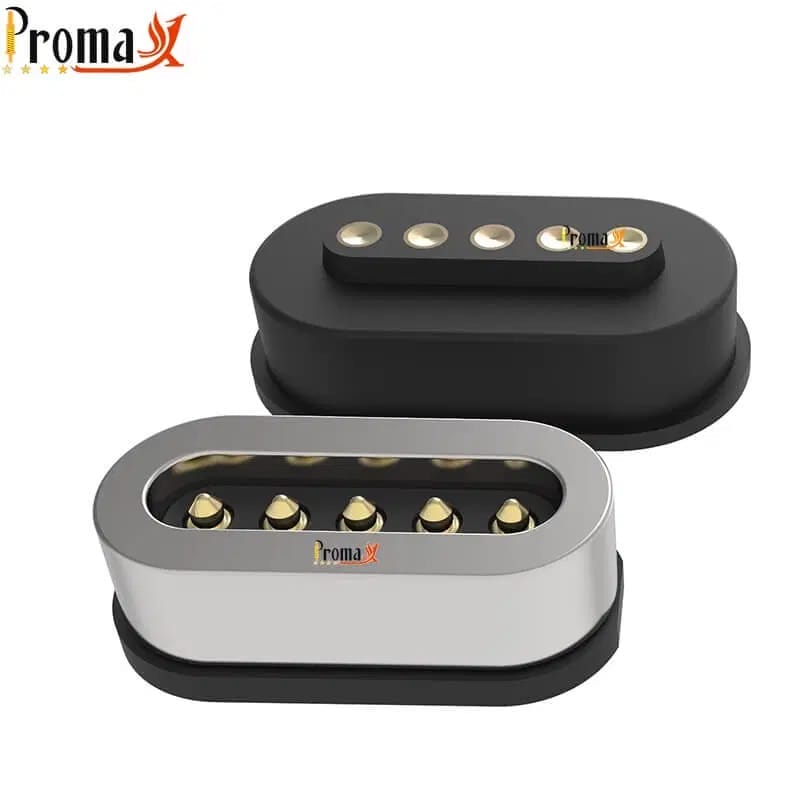
Some rely on a handful of flat contact pads that touch a matching pad on the device. Others use pogo pins, small spring-loaded contacts that push outward and press firmly against whatever they meet. Both approaches carry power, and some carry data too, but they don’t behave the same way under stress.
A flat pad depends on surface contact staying clean and flush. A pogo pin’s spring keeps pushing through dust or light corrosion to maintain contact. That’s why the pin approach shows up more often in products meant to survive years of daily use.
The magnet gets most of the attention because it’s the part you feel. The contact underneath is the part that decides whether your charge is fast, stable, and still working the same way a year from now. That’s the piece worth understanding before comparing USB-C, MagSafe, and pogo pin connectors directly.
Does MagSafe Use Pogo Pins?
Yes, at least for the MagSafe you’d find on a MacBook. Apple’s laptop MagSafe connector uses spring-loaded pogo pin contacts sitting inside a magnetic housing. The original version, MagSafe 2, and the MagSafe 3 port on today’s MacBook Pro and Air all use this mechanism. Independent teardowns of the connector confirm this directly. Pull one apart, and you’ll find the same style of gold-plated contact used in industrial connectors, just dressed up for a consumer laptop.
MagSafe on an iPhone is different. It’s a ring of magnets inside the phone that accessories snap onto, with no pogo pins involved. It charges through Qi wireless induction, and the magnets there exist purely for alignment. There’s no physical electrical contact happening.
That distinction matters if you’re evaluating MagSafe as a reference point for an Original Equipment Manufacturer (OEM) build of your own. A pogo pin implementation and a wireless implementation solve completely different engineering problems, even though they share a name. A dedicated guide covers how OEM magnetic connectors handle alignment and contact in more depth.
How does a Pogo Pin Magnetic Connector Compare to USB-C and MagSafe?
Once you know what’s sitting inside each connector, comparing them gets a lot more concrete. USB-C sits at one end as the universal option. It’s fixed, well documented, and built for compatibility across almost every device made in the last several years. MagSafe is Apple’s own implementation, tuned for its laptops and locked to its ecosystem.
A pogo pin magnetic connector sits apart from both because it isn’t a finished consumer product at all. It’s a component an engineer specifies, built around pin count, current, and housing to match whatever’s being designed.
The table below lines up all three against the factors that actually matter for a real decision. That means current and data capacity, how long the contacts hold up, and who gets to customize them.
| Technology | Connection type | Current rating | Data transfer | Durability (mating cycles) | Blind mating | OEM customizable? | Typical use |
|---|---|---|---|---|---|---|---|
| Pogo pin magnetic connector (custom OEM) | Magnet + spring contact | Scales with pin diameter and design — see manufacturer for your configuration | Optional, design-dependent | Design-dependent—varies with spring force, plating, and duty cycle | Yes | Yes—fully custom | Medical devices, industrial equipment, custom OEM hardware |
| USB-C (standard) | Friction-fit, wired | Up to 5A / 240W under USB-PD 3.1 EPR | Up to 40Gbps (USB4) | 10,000 insertion cycles, specified minimum | No—manual alignment | No—fixed standard | Universal consumer and prosumer power + data |
| MagSafe (Apple, laptop generation) | Magnet + pogo pin | Up to roughly 140W on the current MacBook Pro/Air lineup | None — power only | Not publicly rated | Yes | No—Apple proprietary, not licensed | Apple MacBook charging only |
Table sourced against usb.org for the USB Power Delivery specification, IEC 62680, and Apple’s published charging documentation. Figures here are comparison baselines for the technology category, not Promax capability claims.
Notice the pogo pin row doesn’t carry one fixed number for current or cycle life. That’s intentional. A custom connector’s real capability depends on the pin diameter, the plating, and the design it gets built into. The honest answer is that it depends on the build, not on a spec sheet that pretends one number fits every application.
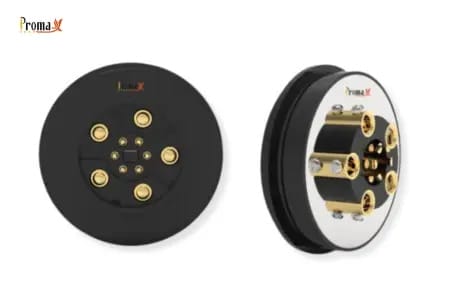
Promax Pogo Pin’s magnetic connector range covers configurations across that entire spectrum. That spans simple single-pin power contacts up to dense multi-pin arrays built for data and power together.
Need pogo pins fast? Talk to an engineer
Get a custom quote, spec matching, and manufacturing guidance without slowing down your project.
- ISO 9001 / 14001 / 45001+ IECQ QC080000
- Manufacturing Since 2014
- Free samples
- Mass production in 15–20 days
What are the Pros and Cons of Magnetic Charging Cables?

Pros of magnetic charging cables
Magnetic connections earn their keep in a few specific ways. Abuse resistance is the big one. Snag the cable, and it pops off cleanly instead of dragging a laptop off a desk or wrenching a port apart. That’s the exact reason magnetic connectors showed up on laptops in the first place, and it’s still the strongest argument for using one today.
Blind mating helps too. You don’t need to see the port or line up pins by hand. That matters in a car, in the dark, or on a device worn rather than held. Over time, that also means less wear on the port itself. A magnetic connection doesn’t grind against the same metal contacts on every single plug-in the way a friction-fit connector does. The port tends to stay cleaner for longer as a result.
None of this comes from the pin or the magnet alone. Reliability comes from the whole system: the alignment tolerance, the spring travel in the contact, the plating, and how consistently the assembly gets built. Together, those factors decide whether a connector actually holds up.
This pattern is well documented in connector reliability testing standards, and it holds regardless of who makes the part. A well-matched system delivers all three advantages together. A poorly matched one delivers none of them, no matter how strong the magnet feels in your hand.
Cons of magnetic charging cables
The honest downsides are real, too. A magnetic connector costs more to build than a standard USB-C cable, since it adds a magnet, tighter tolerances, and more assembly steps. Strong magnets can interfere with nearby sensitive components. That’s a real design constraint, not a theoretical one, especially in compact electronics packed with sensors.
And at the very top end of charging speed, a magnetic interface adds contact resistance that a direct USB-C connection simply doesn’t have. A magnetic solution will sit below USB-C’s highest power tier instead of above it. That makes it the wrong choice if raw charging speed is a priority for your application.
When Should You Choose Each Technology?
The right choice depends on what you’re building or buying for.
USB-C makes sense whenever you need universal compatibility, real data transfer, or the highest power tier available today. It’s the default option for a reason. Nothing about a magnetic connection changes that if your use case needs to work with everything already on the market.
MagSafe only makes sense if you’re already inside the Apple ecosystem. It’s proprietary, and Apple hasn’t licensed the laptop version for third-party use. You can charge with it if you own the hardware it was designed for, but you can’t adopt it for a product you’re building. Anyone comparing a magnetic charger versus USB-C for their own product won’t find MagSafe on the table at all.
A pogo pin magnetic connector fits a third category: your own product. Say you’re designing hardware that needs a durable, tool-free connection, with control over pin count, current rating, and housing. A custom pogo pin connector exists for exactly that job. A medical cart dock, a rugged handheld scanner, and a wearable charging cradle all land in this lane for the same reason.
A pogo pin magnetic connector isn’t something you buy off a shelf. It’s something you specify from the ground up, matched to the device you’re actually building rather than the closest thing available at retail.
How Promax Pogo Pin Supports OEM Magnetic Connector Design
If a pogo pin magnetic connector is the right fit for what you’re building, the next step is turning that into an actual part. Promax Pogo Pin builds custom magnetic connectors from 1 to 22 pins, sized to whatever interface and space your product needs. Current ratings run up to 5A per pin, scaling with pin diameter, plating, and the thermal design of your housing. We build the connector around your product, instead of the other way around.
Send over your design specs and our engineering team will respond with a concrete recommendation for your project. Samples ship within two weeks, so you can test the fit before committing to a production run.
Magnetic Charging Cable FAQs
Do magnetic charging cables work with any phone?
No, not universally. USB-C cables work across most modern Android phones and iPhone 15 and later. Proprietary systems like MagSafe, or a custom pogo pin dock built for a specific product, are device-specific by design. Swapping between ecosystems usually means swapping the cable too.
What’s the difference between MagSafe and a pogo pin connector?
MagSafe is Apple’s closed system, built only for Apple’s own products. A pogo pin magnetic connector is an open platform. An OEM can specify it for almost anything they’re building, from wearables to industrial docking stations.
Can magnetic charging cables handle USB-C speeds?
Usually not at the very top tier. Magnetic contact interfaces carry slightly more resistance than a direct wired connection. Throughput and power can land a bit below the cable’s rated spec as a result, especially at the highest wattage tiers.
Are pogo pin magnetic connectors waterproof?
That depends on the housing, not the connector itself. Designers engineer water resistance into the housing and specify the Ingress Protection (IP) rating to match. It isn’t a default feature built into the pin.
Can I use a custom magnetic connector in my product?
Yes. You can specify a custom magnetic connector around your exact pin count, current needs, and housing. It matches whatever you’re building, instead of forcing your design to match an off-the-shelf part.
Back to Top : Magnetic Charging Cable: Pogo Pin vs. USB-C vs. MagSafe
Need pogo pins fast? Talk to an engineer
Get a custom quote, spec matching, and manufacturing guidance without slowing down your project.
- ISO 9001 / 14001 / 45001+ IECQ QC080000
- Manufacturing Since 2014
- Free samples
- Mass production in 15–20 days